
AI
Beyond Siri: Here Are the Practical AI Features Coming to Your iPhone in iOS 27


Apple’s Quiet AI Revolution
When Apple took the stage at its Worldwide Developers Conference earlier this month, all eyes were on Siri. The company’s long-awaited AI overhaul of its voice assistant dominated headlines, generating buzz about a smarter, more context-aware Siri that can finally understand who you are and take meaningful action on your behalf.
But if you looked beyond the Siri spotlight, something equally — perhaps even more — interesting was happening. Quietly embedded throughout Apple’s iOS 27 announcement were a series of smaller, practical AI-powered features that are set to transform the way you use your iPhone every single day.
These are not flashy chatbot interfaces or futuristic voice commands. They are tools that disappear into the background of apps you already love — Messages, Safari, Home, Calendar, Shortcuts — making them smarter, faster, and more intuitive without asking you to change how you work. In Apple’s vision for AI, the technology should feel invisible. It should just work.
This is Apple Intelligence at its most practical: not a feature you go to, but a capability woven into everything you already do.
In this post, we’re breaking down every notable AI feature coming to iOS 27 that isn’t Siri — what it does, why it matters, and how it fits into Apple’s broader strategy for making the iPhone the most intelligent device in your pocket.
Apple’s Broader AI Strategy: Smarter Software, Not Just a Smarter Assistant
Before we dive into the individual features, it’s worth understanding the philosophy driving Apple’s approach to AI in iOS 27.
Most AI products on the market — from Google’s Gemini to Microsoft’s Copilot — ask you to go somewhere new. You open a chat window, type a prompt, and wait for a response. The AI exists as a separate layer on top of your existing tools.
Apple is doing something different. Rather than asking consumers to adopt a new AI-powered Siri to unlock the benefits of AI, the company is weaving artificial intelligence directly into the apps and services people already use, focusing tightly on solving real-world, everyday problems.
The result is a collection of features that feel less like AI and more like your phone just got a lot smarter overnight. Your iPhone will split the restaurant bill, keep your passwords safe after a data breach, help you build powerful automations without any coding knowledge, and organize your Safari tabs before you even think to ask.
Individually, these features might not sound revolutionary. But combined, they represent a coherent vision: AI that enhances the software itself, rather than sitting alongside it as a bolt-on chatbot. For millions of iPhone users who will never actively engage with an AI assistant, this approach may prove to be far more impactful.
The features are currently live in the iOS 27 developer beta, will arrive in the public beta shortly, and are set for general release later this fall.
1. AI-Powered Bill Splitting with Apple Cash
The Problem It Solves: Splitting a restaurant bill has always been awkward. Someone has to calculate totals, figure out who ordered what, account for tax and tip, and then chase people down for payment. It’s a minor social friction point that happens constantly.
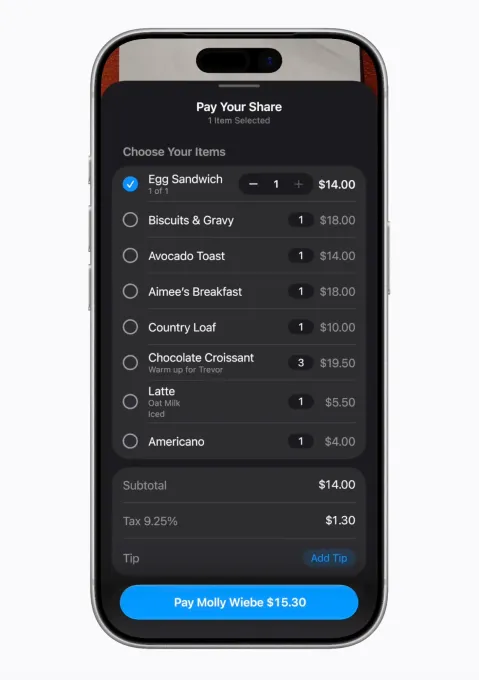
What iOS 27 Does: With iOS 27, Apple is bringing AI-powered bill splitting directly into Apple Cash. The process is remarkably simple: take a photo of your receipt (or upload one from your camera roll), and a new option appears letting you split the bill with others.
Apple Intelligence works in the background to extract the critical details from the bill automatically — item names, quantities, tip amounts, and totals. You select the items you ordered, and then share a request to your group chat via Messages. Each person in the chat can then select their own items and quantities. For those who split a dish with someone else, there’s even a half-serving (1/2) selector. When it’s time to pay, you double-click just as you would for any standard Apple Cash transaction.
Why It Matters: What makes this feature genuinely clever is not just the AI parsing of the receipt — it’s the integration. The bill-splitting option only appears when it’s contextually relevant. It works inside apps people already use daily, like Messages and Apple Cash. There’s no new app to download, no account to create. And it’s smart enough to include each person’s fair share of tax and tip, not just the raw item prices.
This is Apple AI at its most consumer-friendly: solving a real problem in the real world, invisibly, using the apps you already have.
2. Automatic Password Updates After Data Breaches
The Problem It Solves: Password security has evolved dramatically. Most people now use password managers — Apple’s own Passwords app, 1Password, Dashlane, Bitwarden — to generate complex, unique passwords for every account. But here’s the uncomfortable truth: even a perfect password isn’t enough. Data breaches happen constantly, and when they do, your credentials can end up in the hands of bad actors through no fault of your own.
The old solution was to manually go through every affected account, log in, navigate to the security settings, and update your password one by one. It was tedious, time-consuming, and most people simply didn’t do it.
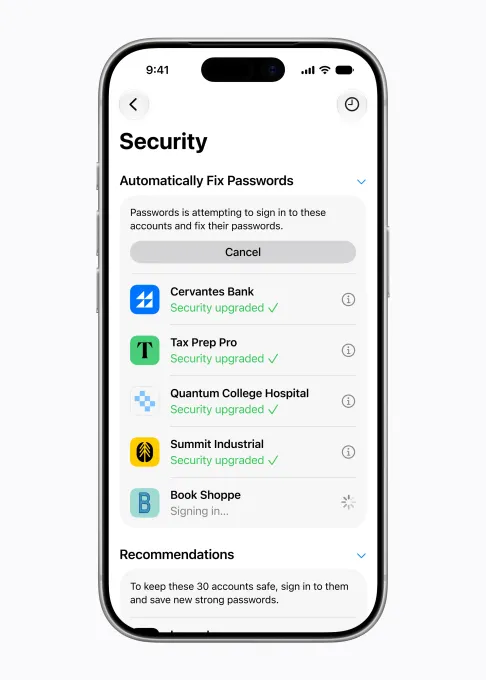
What iOS 27 Does: Apple’s new password-updating feature leverages AI to act agentically on your behalf. When the Passwords app identifies a weak or compromised password — including credentials exposed in a known data breach — it doesn’t just alert you. It takes action.
The feature securely navigates to the affected websites, signs in using your existing credentials, and upgrades your passwords to new, stronger, more secure versions — all automatically, all in the background.
Why It Matters: This is one of the most significant security advancements Apple has delivered in years, and it’s powered entirely by on-device AI working as your digital security agent. The feature bridges the critical gap between knowing your password is compromised and actually doing something about it — a gap that currently leaves millions of users vulnerable for weeks or months after a breach is discovered.
For everyday users who aren’t particularly tech-savvy, this feature could be genuinely life-changing from a security perspective. It removes the friction and the effort from a task that’s easy to procrastinate but potentially devastating to ignore.
3. One-Tap Suggestions in Messages
The Problem It Solves: How many times have you had a conversation in Messages where something came up that you meant to act on — add to your calendar, set a reminder, share some photos — and then completely forgot about it the moment you locked your phone? Conversational context gets lost constantly, and acting on it requires you to manually switch apps and remember what you were doing.
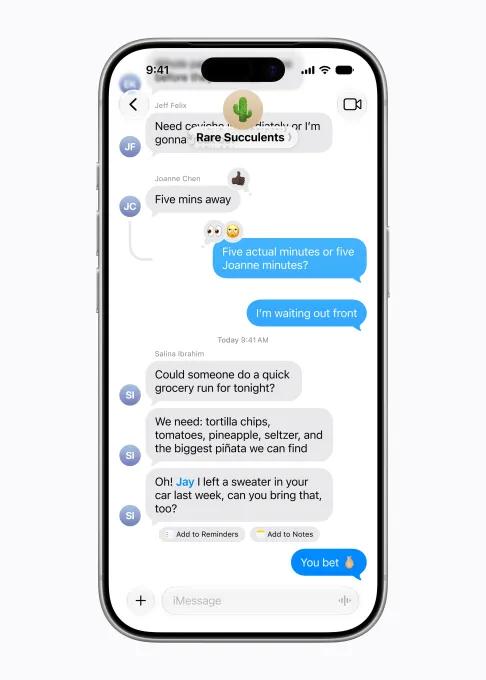
What iOS 27 Does: iOS 27’s Messages app will use Apple Intelligence to offer contextually relevant one-tap suggestions based on the content of your conversations. These suggestions are intelligent, varied, and practical:
- Reminders: If a friend texts asking you to bring something when you meet up, Messages can suggest adding that request to your Reminders with a single tap.
- Photo sharing: If someone asks you to share the photos from a recent event, Apple Intelligence can identify the right photos to send based on its understanding of keywords, people in the images, and location data from your Photos Library.
- Calendar events: If you’re making plans for a dinner date or work meeting in a conversation, Messages can prompt you to add the event to your Calendar — pre-populated with the relevant details.
- And much more: The system is designed to recognize dozens of conversational cues and match them to appropriate actions across the iOS ecosystem.
Why It Matters: The key word in all of this is “one-tap.” Apple isn’t asking you to copy text, switch apps, and manually create a reminder. It’s surfacing the right action at the right moment, directly inside the conversation where the context was created.
Critically, these suggestions don’t feel like an AI assistant interrupting your conversation. They appear as subtle, useful tools within the chat interface — almost like autocomplete, but for actions instead of words.
4. Call Context: Information When You Need It Most
The Problem It Solves: Anyone who has spent time on hold with a customer service line knows the frantic scramble that happens when someone finally picks up: searching through emails for a confirmation number, digging through your messages for a reference code, fumbling with apps while trying to explain your issue. It’s frustrating, it wastes time, and it makes an already stressful experience worse.
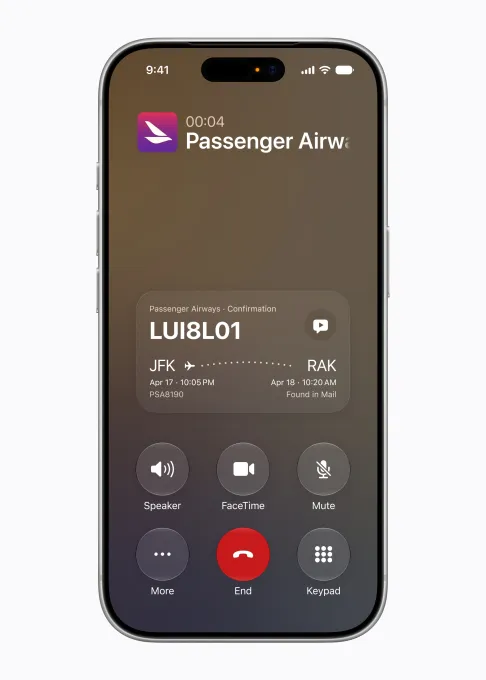
What iOS 27 Does: Call Context is a new feature that quietly surfaces the information you’re most likely to need during a phone call, right on the call screen itself.
The example Apple provides is illustrative: if you’re calling your airline about a reservation, your flight confirmation code will appear directly on the call screen before you even say hello. You don’t have to ask for it. You don’t have to search for it. It’s just there.
Under the hood, Apple Intelligence is scanning your Mail app to pull the relevant information — reservation details, account numbers, order confirmations — and displaying it contextually based on who you’re calling. Critically, this processing happens entirely on-device, protecting your privacy. Apple never sees your email content.
Why It Matters: What makes Call Context particularly elegant is what it doesn’t do. It doesn’t require you to speak to an AI assistant. It doesn’t open a new interface or interrupt your workflow. The information simply appears on the call screen when it’s relevant, and disappears when it’s not. It’s the definition of AI that gets out of your way while still making your life meaningfully better.
For people who regularly deal with customer service, healthcare providers, government agencies, or any organization that requires reference numbers and account details, this feature alone could be a significant quality-of-life improvement.
5. Natural Language Calendar Events
The Problem It Solves: Adding a calendar event has always required a certain amount of mental overhead. Which field do I fill in first? Do I type the location or the title? How do I format the time? For something as simple as scheduling a meeting or a dinner, the process involves more tapping and thinking than it should.
What iOS 27 Does: Apple Calendar in iOS 27 will support natural language event creation. Instead of filling in individual fields, you simply describe the event the way you’d say it out loud: “Lunch with Sarah at Nobu next Thursday at 1 PM” or “Team sync every Monday at 10 AM in Conference Room B.”
Apple Intelligence parses the description, extracts the relevant details — contacts, locations, times, dates, recurrence — and creates the calendar event on your behalf, with a title generated automatically.
Why It Matters: This is a feature that third-party calendar apps like Fantastical have offered for years, and its inclusion in Apple’s native Calendar app is long overdue. For users deeply embedded in the Apple ecosystem who prefer to stay with native apps, this removes one of the few remaining friction points in day-to-day scheduling.
It’s also a small but meaningful example of Apple democratizing features that previously required users to pay for premium apps. Natural language calendar input is now table stakes, and Apple Intelligence is delivering it natively.
6. Vibe Coding Shortcuts: Automations for Everyone
The Problem It Solves: Shortcuts is one of the most powerful apps on iPhone, capable of scripting complex multi-step workflows, creating automations triggered by time or location, and connecting disparate apps in creative ways. It’s also notoriously difficult for non-power users to navigate. The learning curve is steep, the interface is technical, and most people simply give up before getting value from it.
For years, unlocking the true potential of Shortcuts required watching tutorials, browsing Shortcut galleries, or having enough technical know-how to build from scratch. That excluded the vast majority of iPhone users from one of the platform’s most powerful capabilities.
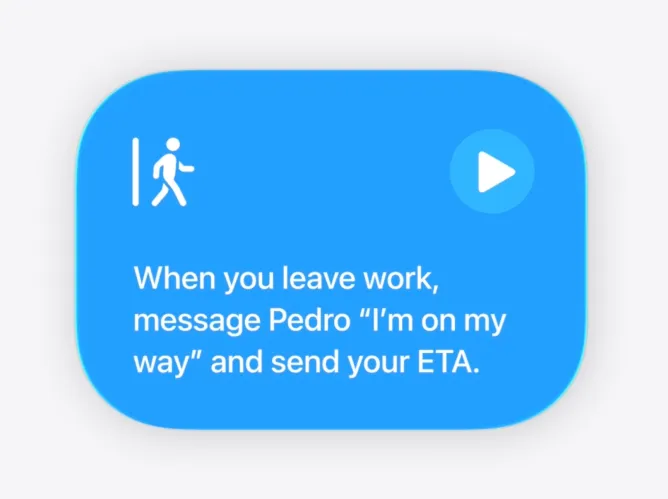
What iOS 27 Does: In iOS 27, you simply describe what you want your iPhone to do — in plain language — and Apple Intelligence will build the Shortcut for you.
Apple’s own examples give a sense of the range:
- Configure your alarm every morning based on what events you have scheduled the following day, so you never oversleep before an early meeting.
- Automatically have your favorite productivity apps open in a specific layout every time you connect a Magic Keyboard to your iPad.
- Send your partner a text with your estimated arrival time automatically when you leave work.
- Turn on your porch lights when your DoorDash delivery is approaching.
These range from deeply practical to genuinely delightful. And none of them require a single line of code or a trip to a tutorial video.
Why It Matters: This feature has the potential to unlock Shortcuts for the hundreds of millions of iPhone users who have never touched the app. By removing the technical barrier entirely, Apple is inviting everyone — not just power users — to experience the joy of having their phone work exactly the way they want it to.
It’s also one of the clearest examples of “vibe coding” applied to a consumer product: you describe the outcome you want, and the AI figures out how to make it happen.
7. Smarter Home Notifications: Less Spam, More Signal
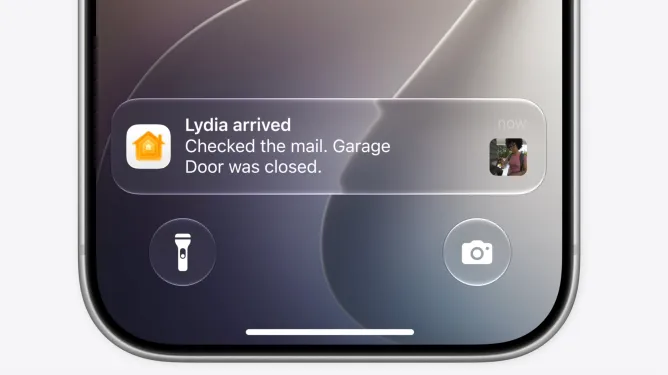
The Problem It Solves: Smart home technology is wonderful until it isn’t. One of the most common complaints among smart home users is notification fatigue — a barrage of alerts for every individual sensor trigger, camera motion event, or door state change. When your partner comes home, raises the garage door, checks the mailbox, and walks through the front door, you might receive four separate notifications in the span of two minutes. It’s noise masquerading as information.
What iOS 27 Does: Apple Intelligence in iOS 27 gives the Home app the ability to understand how multiple smart home events relate to each other and consolidate them into a single, meaningful notification.
Using the same scenario: instead of four separate alerts about the garage, the mailbox, and the front door, you receive one notification: “Someone arrived home and closed the garage door.” The AI has understood the sequence of events, identified the common thread — someone arriving — and delivered a single, useful summary.
Beyond notifications, iOS 27’s Home app also gains AI-powered search, making it easier to find specific clips from your security cameras. Looking for the moment a package was delivered last Tuesday? Describe it in search, and the AI will surface the relevant footage. The Home app will also feature highlighted, noteworthy clips surfaced automatically at the top of the screen for quick review.
Why It Matters: Smart home technology has long been plagued by the problem of too much data and not enough insight. Apple Intelligence doesn’t reduce the data your smart home collects — it filters it intelligently, surfacing only what matters and presenting it in human-readable form. The result is a smart home experience that feels genuinely intelligent rather than merely connected.
8. Safari Tab Organization: Your Browser, Finally Tidy
The Problem It Solves: Tab hoarding is a near-universal habit. Most people have multiple browser windows open with dozens of tabs across many unrelated topics — a recipe, three articles about a trip they’re planning, a product comparison, a work document, and that YouTube video they started last week. Finding anything requires either a perfect memory or a lot of scrolling.
What iOS 27 Does: Safari in iOS 27 uses Apple Intelligence to automatically understand what you’re browsing across websites, then organize your open tabs into relevant topic-based groups.
If you’ve got six tabs open about a vacation you’re planning — hotel options, flight comparisons, restaurant guides, tourist attractions — Safari can group all of them into a “Travel” tab group automatically. These organized groups appear at the top of the browser for easy access whenever you return to your research.
Apple notes that this organizational intelligence respects user privacy completely. The AI processing is done in a way that doesn’t expose your browsing data to Apple or any third party.
Why It Matters: Tab groups in Safari already exist, but the manual effort required to create and maintain them means most users simply don’t bother. By automating the organization process, Apple makes tab management effortless. You get all the benefits of an organized browser without any of the effort.
It’s a small feature in isolation, but for anyone who spends significant time in Safari — researching, reading, shopping, working — it’s the kind of subtle improvement that makes a real difference to daily productivity.

The Common Thread: AI That Gets Out of the Way
Looking across all eight of these features, a clear philosophy emerges. Apple’s approach to AI in iOS 27 is defined by a single principle: AI should be invisible.
None of these features require you to open an AI interface. None of them ask you to write a prompt or engage with a chatbot. They don’t announce themselves with elaborate animations or suggest that you’re using cutting-edge technology. They simply make the apps you already use smarter, faster, and more helpful — and then get out of the way.
This is a deliberately different vision from what most of the tech industry has been building. While competitors race to put chatbots in every corner of their products, Apple is betting that the most powerful form of AI is the kind you never notice but always benefit from.
It’s also a vision grounded in Apple’s longstanding commitment to privacy. Almost every AI feature in iOS 27 runs on-device, meaning your personal data — your emails, your messages, your browsing history, your home activity — never leaves your phone. Apple Intelligence processes it locally, extracts what’s relevant, and acts on it without sending your private information to a server somewhere.
When Can You Get These Features?
iOS 27’s AI features are currently available in the developer beta, which is live now for registered Apple developers. The public beta is expected to arrive in the coming weeks, giving non-developers the opportunity to try the features before the official release.
The general public release of iOS 27 is scheduled for later this fall, likely in September alongside the launch of the iPhone 17 lineup — though the software update will be available for a range of compatible iPhone models, not just the newest hardware.
Should You Be Excited?
Absolutely — but with appropriate expectations.
These features are incremental. They are not the AI revolution that some corners of the tech world have been breathlessly predicting. They will not replace your job, compose your emails, or conduct research on your behalf. What they will do is make your daily iPhone experience meaningfully smoother, smarter, and less frustrating in dozens of small but genuine ways.
For most iPhone users, the AI features in iOS 27 — particularly the smaller, embedded ones described in this article — will be far more impactful than any new version of Siri. Because they work inside the apps and workflows people already use, they don’t require any behavior change or learning curve to deliver value. You’ll just notice one day that your phone seems to understand you a little better, and you won’t quite be able to put your finger on when that happened.
That’s exactly what Apple is aiming for. And based on what we’ve seen in iOS 27, they might actually pull it off.
Final Thoughts
iOS 27 is shaping up to be one of Apple’s most thoughtful software releases in years — not because of any single blockbuster feature, but because of the cumulative effect of dozens of small, intelligent improvements embedded throughout the operating system.
From splitting the restaurant bill to organizing your Safari tabs to protecting your passwords after a data breach, the practical AI features in iOS 27 represent a coherent, privacy-first, user-centered vision for what AI on a smartphone should look like.
Siri may have been the headline. But the real story of iOS 27 is hiding in your Messages app, your Calendar, your Home app, and your browser — quietly making your iPhone smarter one thoughtful feature at a time.
iOS 27 is currently in developer beta. The public beta is coming soon, with a general release expected this fall. Features and availability may change before the final release.
